my tools in 2026
Here's a brief survey of the tools I'm currently using
Computer
I use a 14-inch MacBook Pro M1 Max that I bought in 2021. It is, on balance, the best computer I have ever owned. The keyboard is usable (not the best macbook keyboard ever, but... fine), the screen is lovely, it sleeps when it's supposed to sleep and the battery still lasts a long time.
The right shift key is broken, but using the left one hasn't proved to be much of a challenge.
I usually replace my computers every 5 years, but I don't see any reason why I'd need a new one next year.
Software
editor
The most important piece of software on my computer is neovim. I've been using vim-ish software since 2003 or so, and on balance I think the neovim team has done a great job shepherding the software into the modern age.
I get a bit irritated that I need to edit my configuration more often than I used to with Vim, but coding tools are changing so fast right now that it doesn't seem possible to go back to the world where I edited my config file once every other year.
neovim plugins
My vim config is available here. I won't list all the plugins; there aren't that many, and most of them are trivial, rarely-used or both. The ones I need are:
- telescope.nvim
- I have "open by filename search" bound to
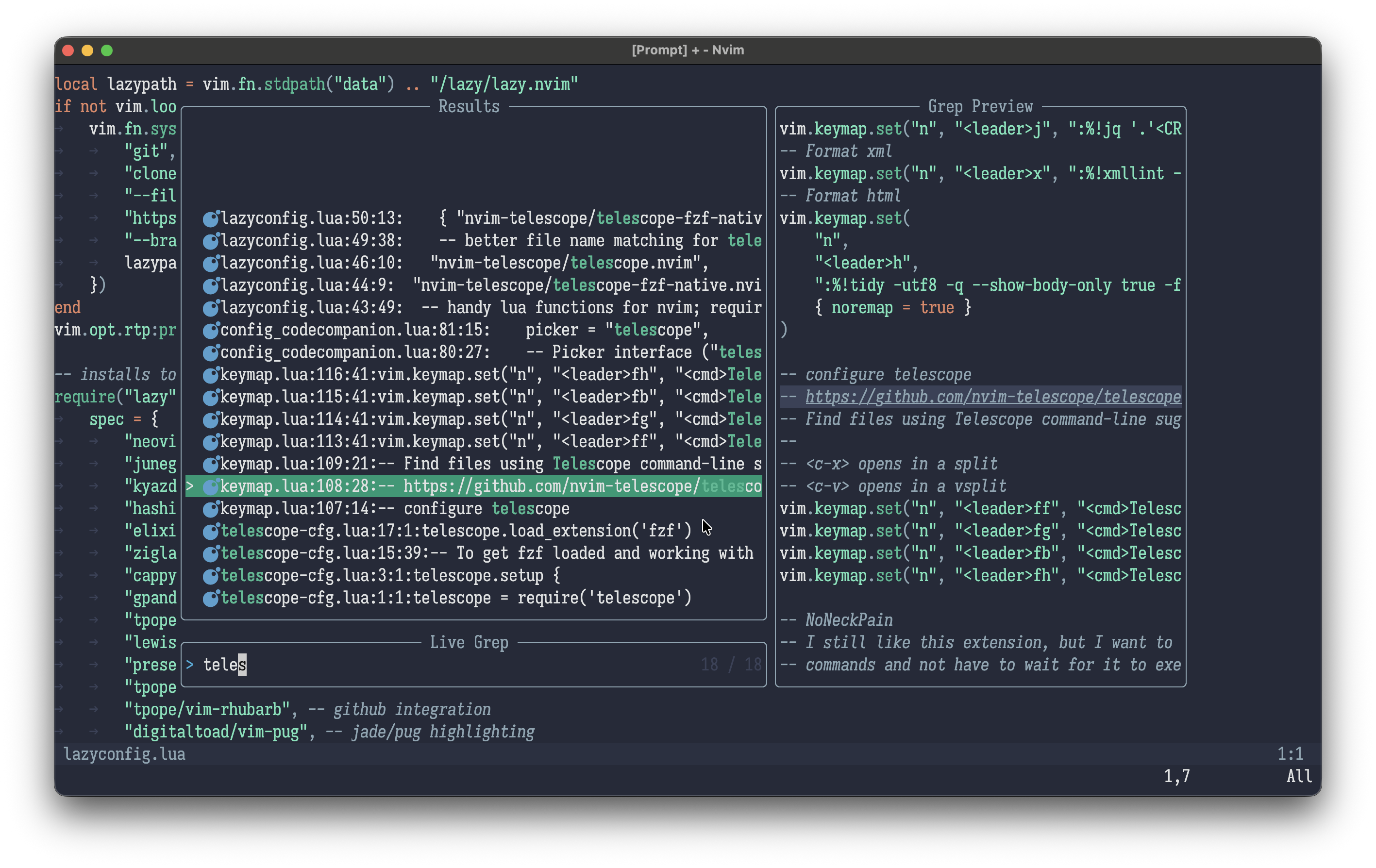
,ffand "open by grep search" bound to,fg, and those are probably the two most common tools I use in vim. Telescope looks great and works fast (I use telescope-fzf-native for grep)
- I have "open by filename search" bound to
- codecompanion
- I added this in January last year, and it's become the default way I interact with LLMs. It has generally very nice features for working with buffers in vim and handles communications with LLMs cleanly and simply. You don't need Cursor et al to work with LLMs in your editor!
- I do use claude code for agentic missions, as I have not had much success with agentic mode in codecompanion - I use it more for smaller tasks while I'm coding, and it's low-friction enough to make that pretty painless
- I added this in January last year, and it's become the default way I interact with LLMs. It has generally very nice features for working with buffers in vim and handles communications with LLMs cleanly and simply. You don't need Cursor et al to work with LLMs in your editor!
- sonokai colorscheme
- I use a customized version, and it makes me happy.
Now that vim has native LSP support, I could honestly probably get away with just those plugins. Here's a screenshot of what nvim looks like in a terminal window for me, with a telescope grep open:
terminal
I use kitty and my config is here.
I'd probably switch to ghostty if it supported opening hyperlinks in a terminal application, but it doesn't.
I use this feature constantly so I want to explain a bit about why I find it so valuable. A common workflow looks like this:
- I
cdto a project directory - I either remember a file name or a string I can search for to find where I want to work
- In the former case, I do
fd <filename> - In the latter, I do
rg <string>
- In the former case, I do
- Then I click on the filename or line number to open that file or jump to that line number in a file
Here's a video demonstrating how it works:
The kitty actions are configured in this file - the idea is that you connect a mime type or file extension to an action; in this case it's $EDITOR <filename> for a filename without a line number, and $EDITOR +${FRAGMENT} <filename> if it has a line number.
terminal software
- I love mise for managing versions of programming environments. I use it for node, terraform, go, python, etc etc
- I have
mise.tomlfiles in most of my projects which set important environment variables, so it has replaced direnv for me as well
- I have
- fd for finding files, a better find
- ripgrep for grepping
- atuin for recording my command line history
- GNU Make and occasionally Just for running tasks
makeis broken and annoying in old, predictable ways; but I know how it works and it's available everywhere- here's an example makefile I made for a modern js project
justis modern in important ways but also doesn't support output file targets, which is a feature I commonly use inmake; see the above file for an example
- gh for interacting with github. I particularly use my
pralias forgh pr createquite a lot to open pull requests - jq for manipulating json
- llm for interacting with LLMs from the command line; see An AI tool I find useful for an example
Browser
I switched from Firefox to Orion recently, mostly because I get the urge to switch browsers every six months or so when each of their annoyances accumulate.
Orion definitely has bugs, and is slow in places, and Safari's inspector isn't nearly as nice as Firefox or Chrome. I wouldn't recommend other people switch, even though I'm currently enjoying it.
browser plugins
- Bitwarden - I dunno, it's fine, it mostly doesn't annoy me
- uBlock origin - I'm very happy with it as an ad blocker
That's it, I don't use any more. Browser plugins have a terrible security story and should be avoided as much as possible.
Note Taking
I use Obsidian, which I publish to the web with the code here (see generating HTML))
It's not clear to me why I like using obsidian rather than just editing markdown files in vim, but I'm very happy with it.
I use Apple's Mail.app. It's... fine enough I guess. I also occasionally use the fastmail web app, and it's alright too.
I am very happy with Fastmail as an email host, and glad I switched from gmail a decade or so ago.
Chat
I use Slack for work chat and several friend group chats. I hate it even though it's the best chat app I've ever used.
I desperately want a chat app that doesn't suck and isn't beholden to Salesforce, but I hate Discord and IRC. I've made some minor attempts at replacing it with no success. It's the piece of software I use day to day that I would most love to replace.
I also use Messages.app for SMS and texts
Music
I switched in October from Spotify to Apple Music. I dislike Apple Music, but I also disliked Spotify ever since I switched from Rdio when it died.
I'm still on the lookout for a good music listening app. Maybe I'll try Qobuz or something? I don't know.
I've also used yt-dlp to download a whole bunch of concerts and DJ sets from youtube (see youtube concerts for a list of some of them) and I often listen to those.
Webcam
I have an old iPhone mounted to my desk, and use Reincubate Camo to connect it to video apps.
I occasionally use OBS to record a video or add a goofy overlay to video calls, but not that often.
Photos
I use Adobe Lightroom to import photos from my Fuji X-T30 and Apple Photos to manage photos.
With the demise of flickr, I really have no place to post my photos and I've considered adding something to my website but haven't gotten it done.
Video
I use vlc and IINA for playing videos, and ffmpeg for chopping them up from the command line